Closed Caption Subtitles: What CC Means on YouTube, TV and Reels
Closed caption subtitles explained: what CC means, how it differs from subtitles and open captions, and how to turn it on for YouTube, TV and Reels.

On this page
- What does CC mean?
- Are closed caption subtitles the same as subtitles?
- Closed, open and subtitles at a glance
- How do I turn on closed caption subtitles on YouTube?
- How do closed captions work on TV?
- Do Instagram Reels have closed captions?
- Closed caption subtitles for creators: which should you use?
- How to write good closed captions (with Indian examples)
- Common problems with closed captions (and fixes)
- Making captions faster with GetNixa
- Wrapping up
- Frequently asked questions
You see the little CC button on YouTube, a “Subtitles/CC” menu on your TV, and “English CC” in streaming apps. So what are closed caption subtitles, and are they different from normal subtitles? This guide answers that in plain words.
You will also learn how to switch CC on for YouTube, TV and Instagram, and how to make your own reels readable for people who watch on mute.
Quick answer: Closed caption subtitles are on-screen text that the viewer can turn on or off, marked CC. They usually show the dialogue plus sounds such as [music] or [door slams], so deaf and hard of hearing viewers can follow. Open captions, by contrast, are burned into the video and always show.
What does CC mean?
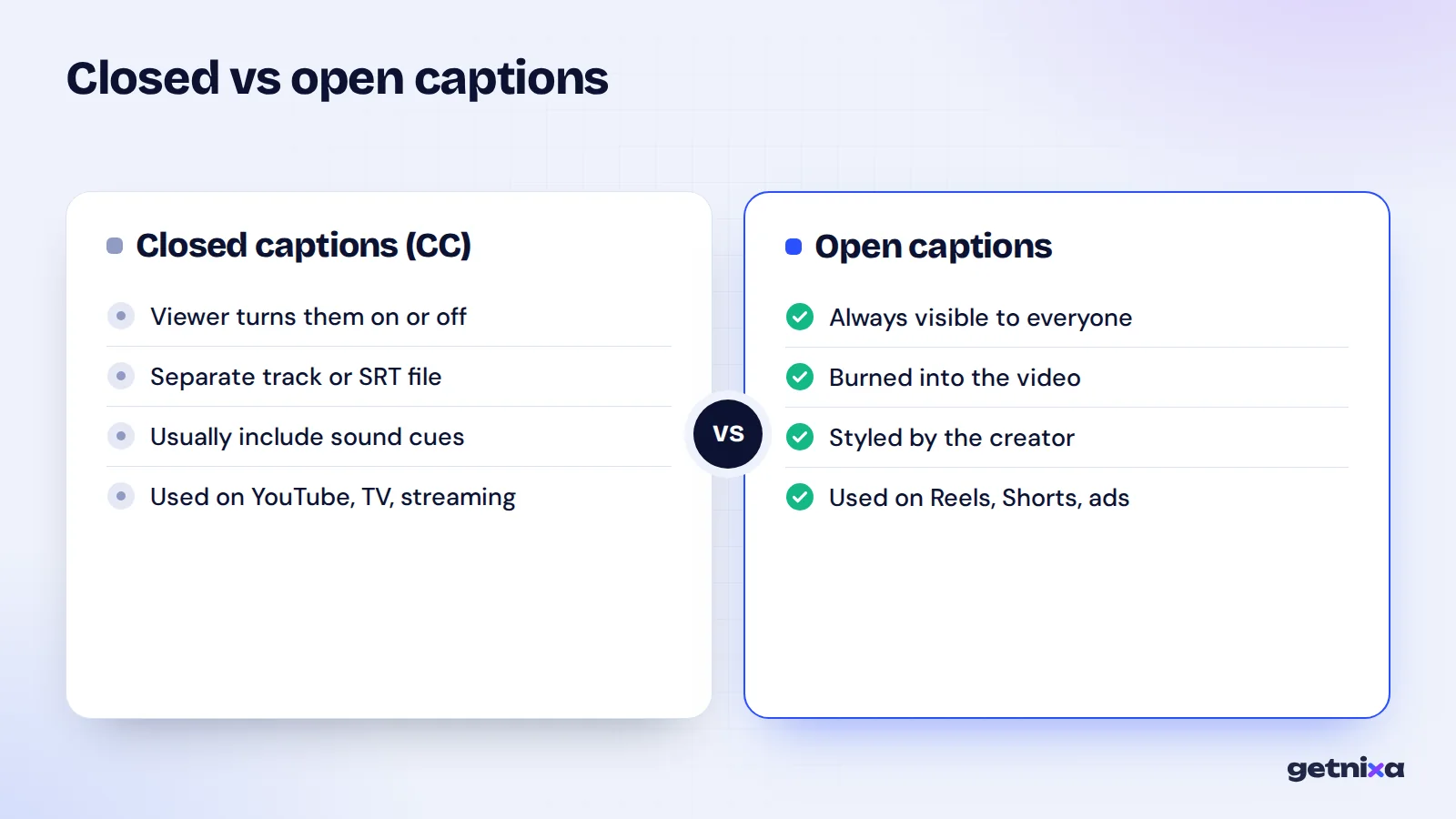
CC stands for closed captions. The word “closed” means hidden until you open them. The text lives in a separate track or file, and your player only shows it when you press the CC button or switch captions on in settings.
Open captions are the opposite. They are part of the video picture itself, so nobody can switch them off. Most Instagram reels with bold, animated words use open captions.
The US National Institute on Deafness and Other Communication Disorders explains the split simply in its guide to captions for deaf and hard of hearing viewers: closed captions can be toggled by the viewer, open captions are always displayed.
Are closed caption subtitles the same as subtitles?
Not quite, although most apps now put both under one menu. The difference is about who the text is for.
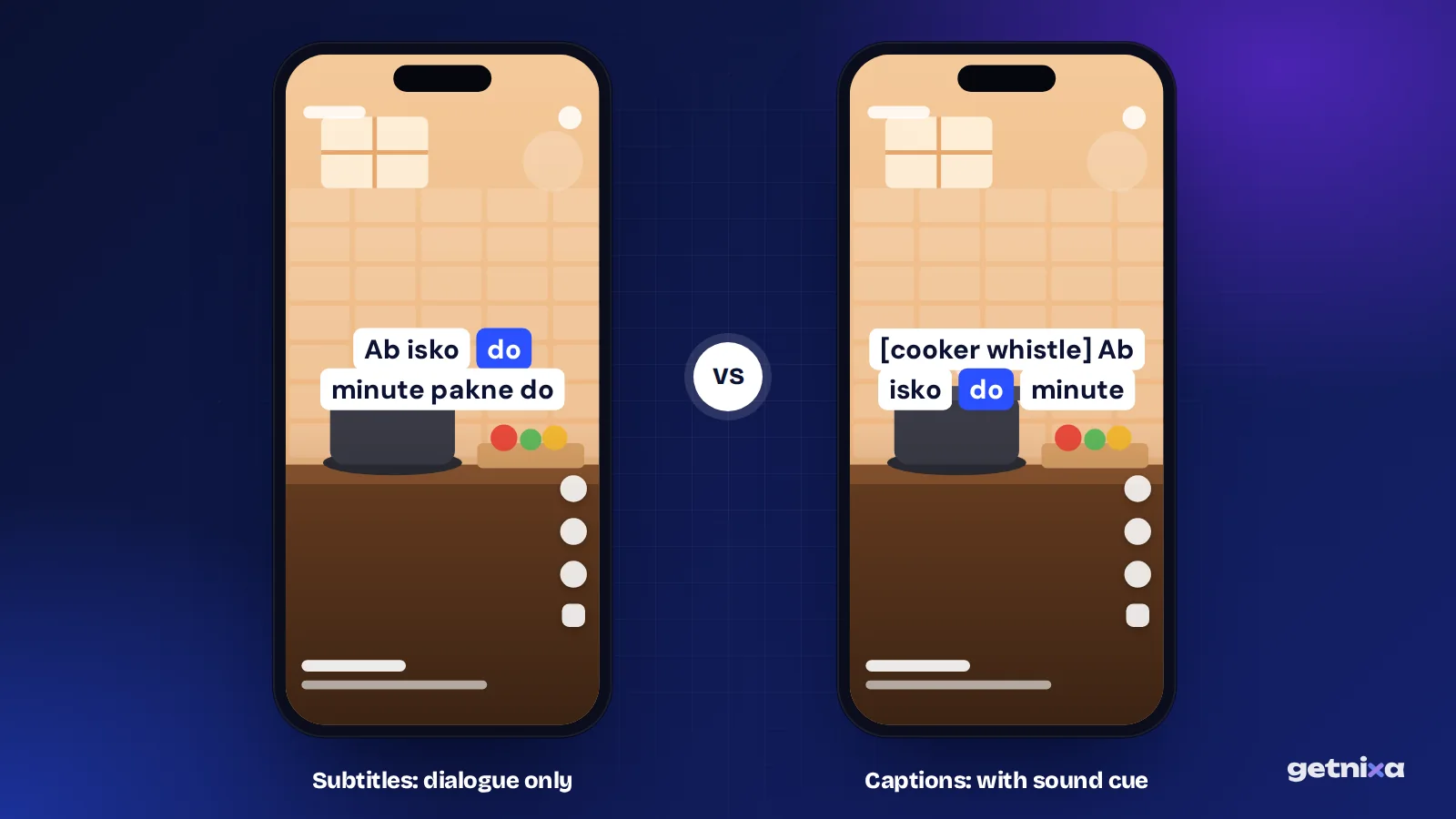
- Closed captions assume the viewer cannot hear. So they include speech, speaker names when needed, and important sounds like [phone buzzing] or [crowd cheering].
- Subtitles assume the viewer can hear but may not understand the language. So they usually show only the spoken words, often translated.
- SDH means subtitles for the deaf and hard of hearing. It is a subtitle track written in the caption style, with sound cues included. Streaming apps often label it “English (SDH)” or “English CC”.
For a longer breakdown with examples, read our guide on captions vs subtitles.
Closed, open and subtitles at a glance
| Type | Can viewer turn it off? | Includes sound cues? | Where you see it |
|---|---|---|---|
| Closed captions (CC) | Yes | Yes | YouTube, TV, streaming apps, Instagram auto captions |
| Open captions | No | Sometimes | Reels, Shorts and ads with text burned in |
| Subtitles | Usually yes | No | Films and shows in another language |
| SDH subtitles | Yes | Yes | Streaming apps, Blu-ray discs |
How do I turn on closed caption subtitles on YouTube?
On a computer, the steps come straight from YouTube’s subtitle settings help page.
- Open the video. If captions exist, a Closed captions (CC) icon shows at the bottom right of the player.
- Click the CC icon. Captions appear. Click it again to hide them.
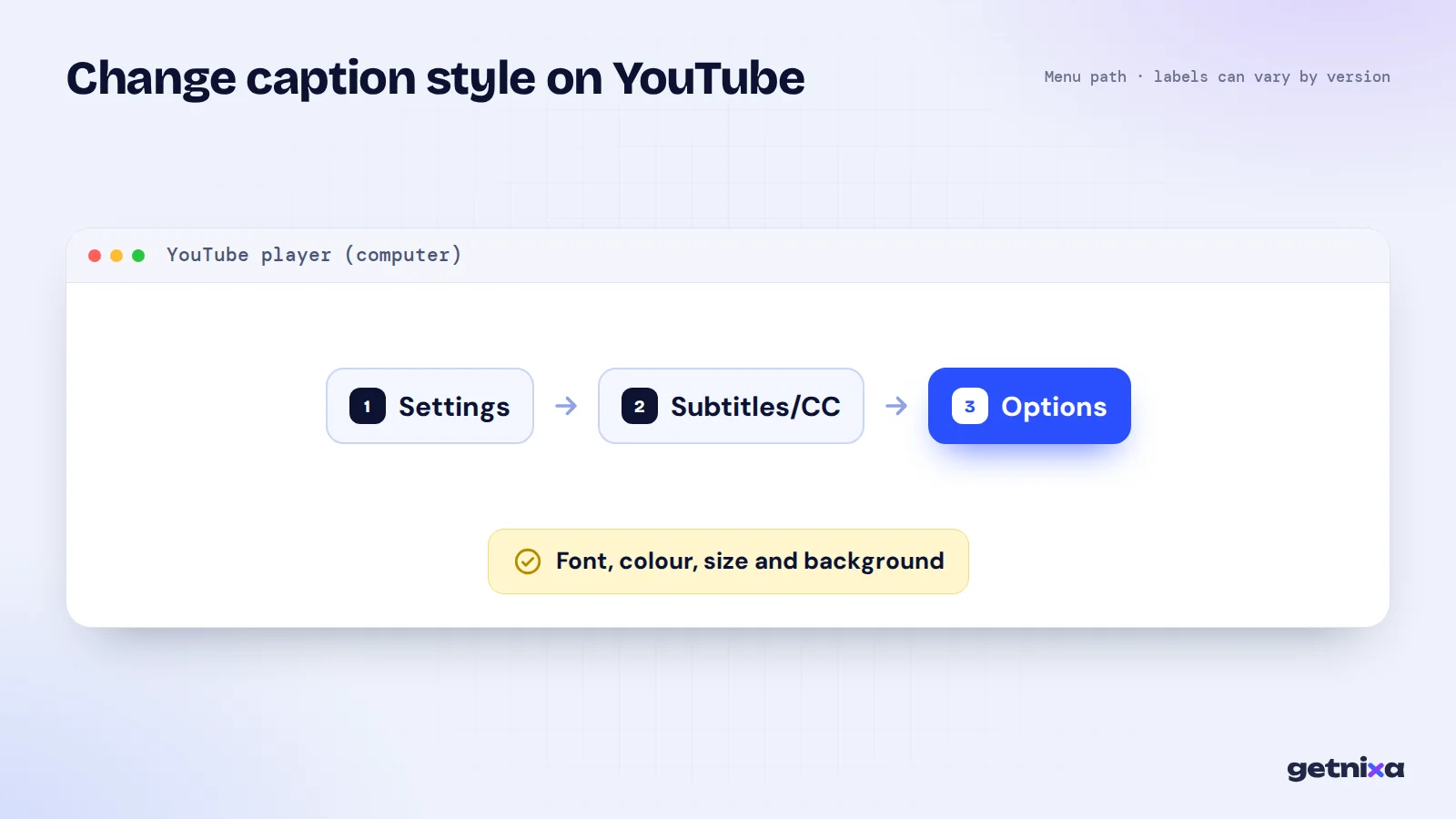
- Change the look if you need to. Click Settings (the gear), then Subtitles/CC, then Options. You can change font, colour, size, background and edge style.
On the phone app, captions are also controlled from the player, through a CC icon or the settings menu. The exact spot shifts between app versions, so look for “Captions” or “CC” when you tap the video.
Tip: If the CC icon is missing, the video has no caption track. The creator never uploaded one, and YouTube’s automatic captions are not available for that video or language.
How do closed captions work on TV?
On a TV, captions are usually switched on from the TV’s menu, often under Accessibility or Subtitles. If you watch through a set-top box, you may need to switch captions on in the box’s menu too, not only on the TV.
Live TV news and sport often use real-time captions, typed by a trained captioner as people speak. That is why live captions sometimes lag a second or two behind the voice, and why they can carry small spelling errors. Pre-recorded shows use prepared captions that are timed in advance, so they line up better.
Do Instagram Reels have closed captions?
Yes, in a way. Instagram can generate captions automatically, and viewers who switch them on see text that they can turn off again. That makes them closed captions. In the mobile app, viewers usually find the switch in their profile menu under Accessibility, then Captions. The labels differ slightly between Android and iPhone, and the option is not on the computer version.
But most creators do not rely on that switch. They burn captions into the reel, so the words show for everyone, styled the way they want. That is open captioning. Our guide on how to add captions to Instagram Reels walks through both routes.
Note: If your reel already has burned-in captions and you also add Instagram’s auto captions, the two sets of text can overlap. Pick one.
Closed caption subtitles for creators: which should you use?
Here is a simple decision guide.
- Use closed captions (an SRT or VTT file) if you post long videos on YouTube, Facebook, LinkedIn or a course platform, or you want viewers to choose their language.
- Use open captions (burned in) if you post Reels, Shorts, WhatsApp status videos or ads, where the app has no reliable caption upload and most people scroll on mute.
- Use both if you publish the same video in two places. Burn captions into the reel version, and upload a caption file for the YouTube version.
A closed caption file is usually an SRT file: a plain text file with numbered lines and timestamps. Our explainer on what an SRT file is shows the format with a sample.
How to write good closed captions (with Indian examples)
Good captions are not only correct words. They also carry meaning that the sound gives a hearing viewer. A few rules help.
- Add sound cues in square brackets. For example, [pressure cooker whistle] or [song plays in background]. Keep them short.
- Name the speaker when it is not obvious. In a podcast clip with two hosts, write “Riya:” or use a dash for a new speaker.
- Choose a script and stick with it. For Hindi speech, decide on Devanagari (हिंदी) or Hinglish in English letters. Mixing both in one video confuses readers.
- Keep code-mixed speech as spoken. If someone says “Yeh product kaafi value for money hai”, write it that way. Do not force it into pure Hindi or pure English.
- Keep lines short. About 32 to 42 characters per line and two lines at most read well on a phone.
- Stay out of the way. On reels, keep text above the bottom area where the app shows the username and buttons.
Common problems with closed captions (and fixes)
| Problem | Why it happens | Fix |
|---|---|---|
| No CC button on YouTube | No caption track exists | Upload an SRT file in YouTube Studio |
| Auto captions write Hindi words wrongly | Speech recognition guessed from mixed speech | Edit the track, or upload your own corrected file |
| Captions cover faces or on-screen text | Fixed position at the bottom | Burn captions at a better height for that video |
| Hindi shows as boxes | File not saved as UTF-8 | Re-save the caption file as UTF-8 |
| Captions lag behind speech on TV | Live real-time captioning | Normal for live shows; recorded shows sync better |
Making captions faster with GetNixa
Typing captions by hand works for a short clip. For regular posting, an auto caption tool saves hours. GetNixa is one option that was built first for Indian creators.
- Upload and pick the language. Choose from 30 languages, including Hindi, Hinglish, Tamil, Telugu, Bengali and Marathi. Hindi can come out in Devanagari or English letters.
- Fix words. Click or double-click any word to correct it. You can also add sound cues by typing them in.
- Export the way you need. Burn styled captions into an MP4 for Reels, Shorts or WhatsApp, or export an SRT file for closed captions on YouTube. SRT is on every plan, and no plan adds a watermark.
For closed captions, the SRT generator page explains the file route, and the YouTube subtitle generator page covers uploading to YouTube. If you want burned-in text instead, try the subtitle generator. The Free plan gives 30 caption minutes a month for videos up to 2 minutes, without a card.
And if you still need the basics of putting text on a video, see our guide on how to add subtitles to a video.
Wrapping up
Closed caption subtitles are text the viewer controls, usually with sound cues for people who cannot hear. Open captions are always on. For long videos, give viewers a caption file. For reels, burn the words in. Either way, make the text accurate and easy to read.
Make captions people can read on mute, in Hindi, Hinglish or English. Export burned-in MP4 captions or an SRT file for CC, free and without a watermark.
Frequently asked questions
What is the difference between CC and subtitles on my TV?
CC shows the dialogue plus sounds like music or a knock at the door, for viewers who cannot hear. Subtitles usually show only the spoken words, often translated, for viewers who can hear but do not know the language. Many TVs now list both under one Subtitles or Captions menu, so check the track name.
Should I choose English CC or English subtitles on a streaming app?
Choose English CC or SDH if you want sound cues, such as [laughs] or [thunder], and speaker labels. Choose plain English subtitles if you can hear the audio and only want the dialogue. For a show in Hindi or another language you do not speak, plain subtitles are usually enough.
Can I turn on closed captions for any YouTube video?
Only if the video has a caption track. That can be a file the creator uploaded or YouTube’s automatic captions, which are not available for every video or language. If the CC icon is missing at the bottom right of the player, the video has no captions you can switch on.
Are auto-generated captions closed captions?
Yes, if the viewer can switch them on and off, as on YouTube and Instagram. But auto captions come from speech recognition, so they can get names, slang and mixed Hindi and English speech wrong. Creators should review and correct them, especially for tutorials, product names and anything where a wrong word changes the meaning.
Do reels need closed captions or open captions?
Most reels use open captions, burned into the video, because the creator controls the style and everyone sees them even on mute. Closed captions on Instagram depend on the viewer switching them on. A good habit is burned-in captions for reels and a caption file for the longer YouTube version.

Written by
GetNixa Team
The team behind GetNixa, the AI caption app for Indian creators. We write practical guides on captions, editing and growing on Instagram and YouTube.