Open Caption vs Closed Caption: Which One Your Reels Need
Open caption vs closed caption explained: what each is, a full comparison, and which one your Reels, Shorts, WhatsApp and YouTube videos need.

On this page
- What is the difference between an open caption vs closed caption?
- Open captions
- Closed captions
- Open caption vs closed caption: full comparison
- Which captions do Reels and Shorts need?
- The WhatsApp and forwarding problem
- When closed captions are the better choice
- How do I add open or closed captions?
- Steps for open (burned-in) captions
- Steps for closed captions on YouTube
- Common mistakes and how to fix them
- Quick decision guide
- Making both kinds faster in GetNixa
- The short version
- Frequently asked questions
Open caption vs closed caption comes down to one question: who decides whether the text shows up, you or the viewer? Open captions are part of the picture and always show. Closed captions sit in a separate file, and the viewer turns them on or off.
For Reels, Shorts and WhatsApp, that choice decides whether people scrolling on mute see your words at all. Here is how to choose, platform by platform.
Quick answer: Open captions are burned into the video and can’t be turned off, so they suit Reels, Shorts, WhatsApp and ads. Closed captions live in a separate file such as SRT and the viewer toggles them with a CC button, so they suit YouTube, courses and long videos. Many creators use both.
What is the difference between an open caption vs closed caption?
Both show the same words. The difference is where the text lives and who controls it.
Open captions
An open caption is text drawn into the video frames during export. People also call it burned-in, hardcoded or embedded text. Once the video is exported, the words are pixels, just like your face or the background.
So they show on every app and every phone, with no setting to switch on. But they also can’t be switched off, resized by the viewer, or corrected without exporting the video again.
Closed captions
A closed caption is a separate timed text file, such as SRT or VTT, that the video player shows on top of the video. The viewer clicks or taps a CC button to show or hide it. The W3C Web Accessibility Initiative describes most captions this way: text people can hide or show, while open captions are always displayed.
Because the text stays separate, you can fix a typo by uploading a new file. You can also add several languages to one video. Our guide on what CC means on YouTube, TV and Reels explains the label in more detail.
Open caption vs closed caption: full comparison
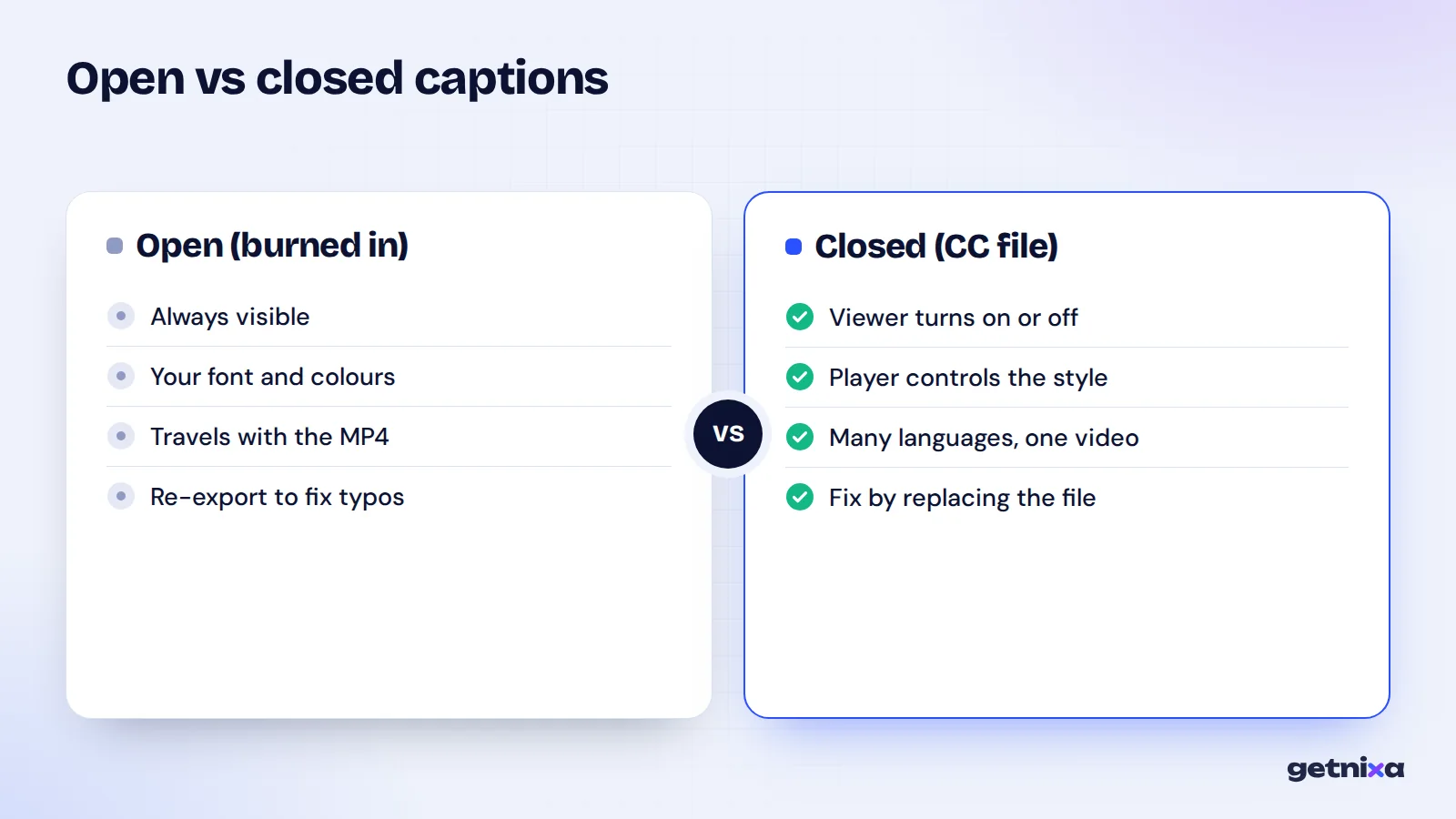
| Factor | Open captions | Closed captions |
|---|---|---|
| Can the viewer turn them off? | No | Yes, with a CC button |
| Where the text lives | Inside the video pixels | Separate file (SRT, VTT and others) |
| Style control | You choose font, colour, animation | Mostly the player and viewer decide |
| Fixing a typo | Re-export and re-upload the video | Edit or replace the file |
| More than one language | One video per language | Many tracks on one video |
| Works when shared as a file | Yes, text travels with the MP4 | Usually no, the file stays behind |
| Best for | Reels, Shorts, WhatsApp, ads, screens in shops | YouTube long videos, courses, webinars |
Which captions do Reels and Shorts need?
For short vertical video, open captions are the safer default. Many people scroll with the sound off, and an open caption shows no matter what their settings are.
Instagram can also write automatic captions using speech recognition, as explained on Instagram’s help page on closed captions for reels. That is a closed caption. Whether a viewer sees it depends on their app and settings, and you can’t style it to match your brand. So most creators burn their own captions in and treat Instagram’s version as a backup. For the full process, see how to add captions to Instagram Reels.
The same thinking applies to YouTube Shorts. Open captions guarantee the words show while the clip autoplays in the feed.
The WhatsApp and forwarding problem
In India, a lot of video spreads through WhatsApp groups and Status. When someone forwards your clip, only the MP4 travels. A separate caption file never goes with it.
So if your content gets shared in family or customer groups, open captions are the only kind that survive the journey. This also matters for shop owners who post offers to WhatsApp Business and Status.
When closed captions are the better choice
Closed captions win when the viewer’s control matters more than your styling.
- Long YouTube videos. Viewers can turn text off if it distracts them, and they can change size and colour in the player settings.
- Several languages. One video can carry a Hindi track, an English track and more. Viewers pick their own.
- Courses and training. You will update lessons over time, and editing a file is quicker than re-exporting video.
- Videos with on-screen text or slides. Viewers can hide captions when they block a chart.
YouTube’s subtitle settings page shows how viewers on a computer can change font, colour, size and background through Settings, then Subtitles/CC, then Options. Open captions can’t offer that.
How do I add open or closed captions?
You start the same way for both: make an accurate, timed transcript. The last step is where they split.
Steps for open (burned-in) captions
- Create the captions. Transcribe the speech by hand or with an AI caption tool, with timing.
- Proofread every line. Fix names, numbers and Hindi words written in English letters.
- Style them. Pick a bold, readable font, a contrasting colour, and keep two lines or fewer.
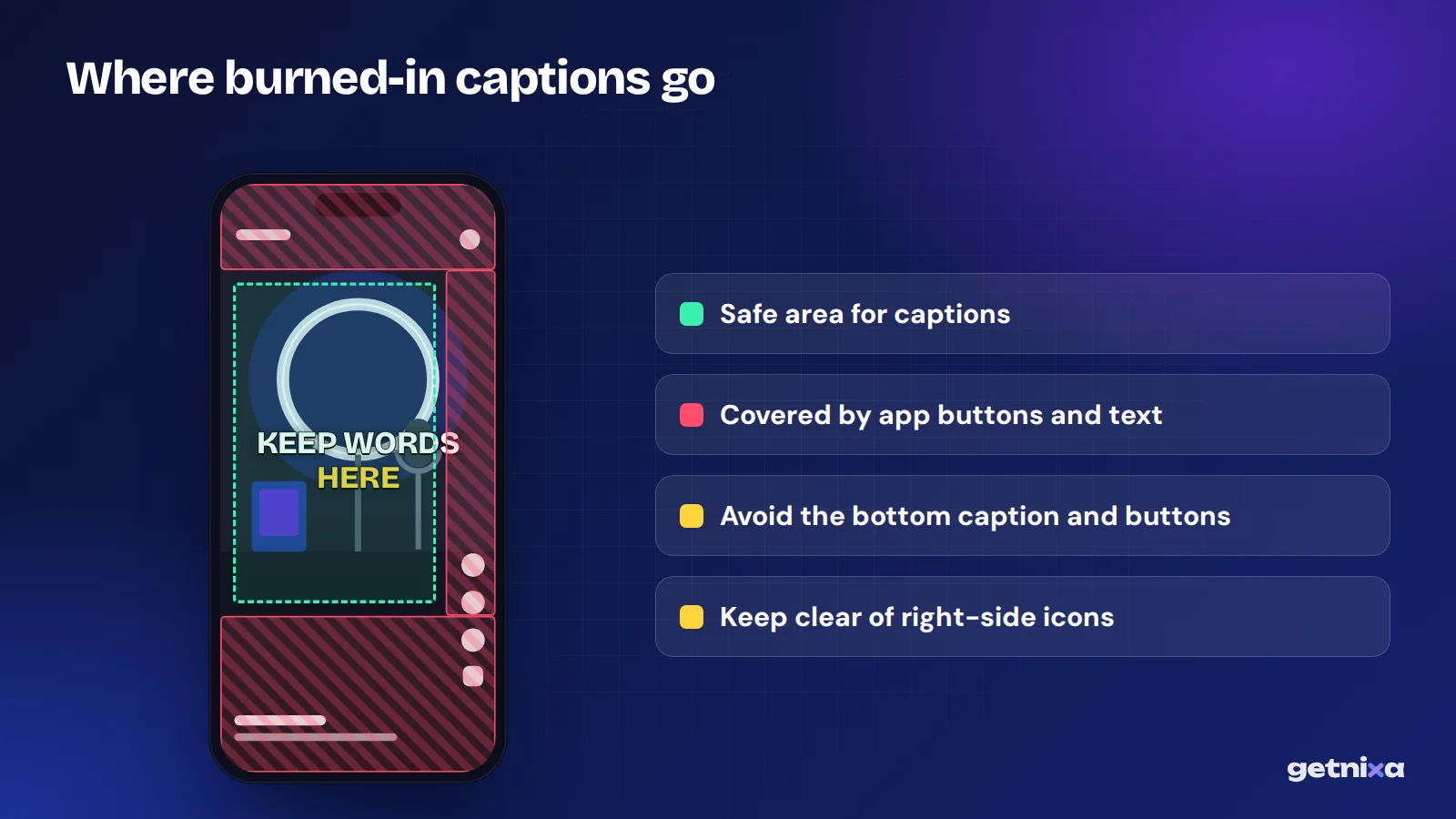
- Place them safely. Keep text away from the bottom app buttons and the right-side icons.
- Export the MP4. The text is now part of the video, so check it once on your phone before posting.
Steps for closed captions on YouTube
- Export an SRT file. Save your timed captions as SRT from your caption tool or editor.
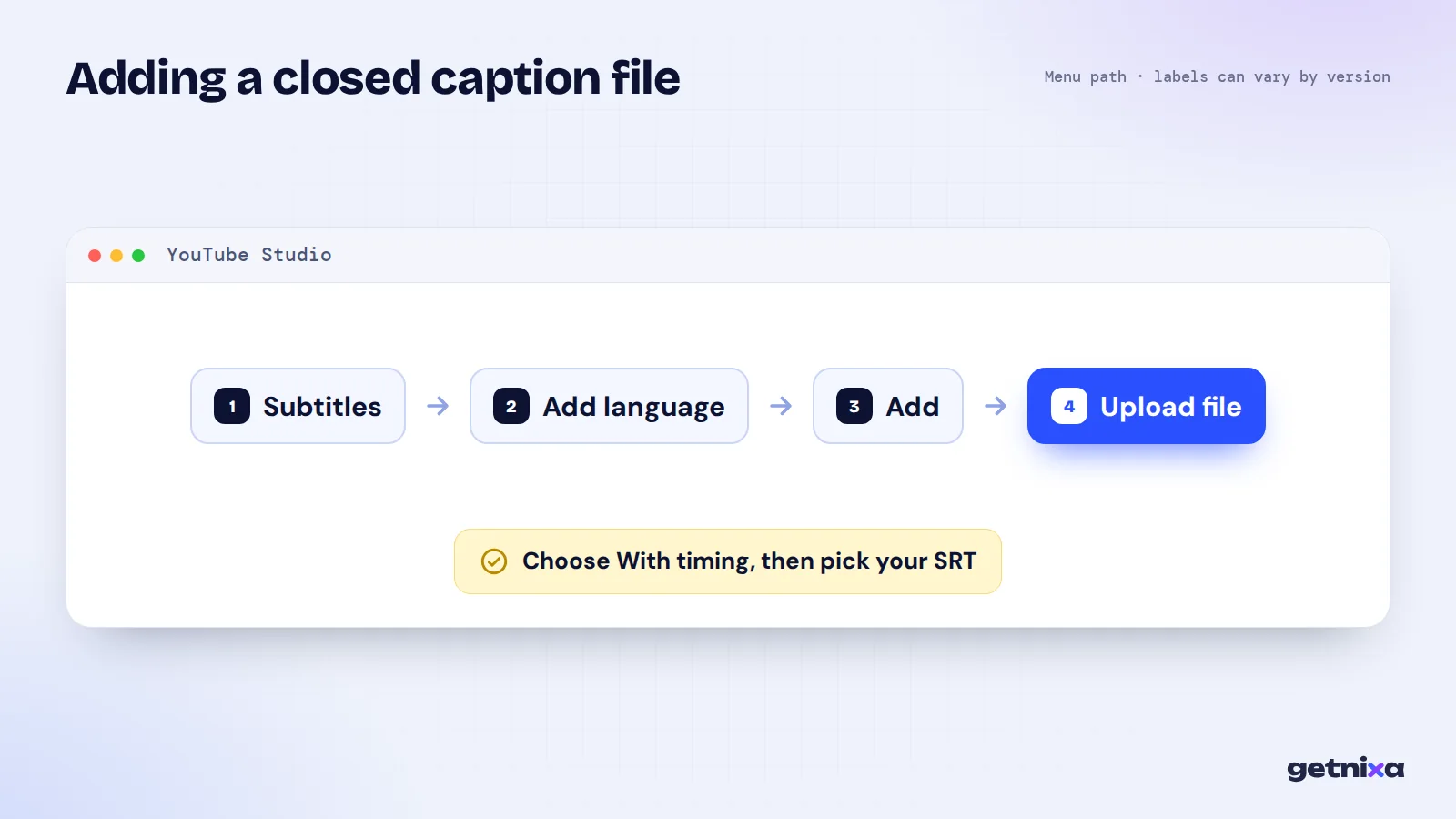
- Open YouTube Studio. Click Subtitles in the left menu, then select your video.
- Add a language. Click Add language and choose the language of the file.
- Upload the file. Under Subtitles click Add, choose Upload file, then With timing, and pick your SRT.
- Save and check. Click Save, then play the video with CC on to test it.
Not sure what is inside an SRT? Our post on what an SRT file is shows a sample. For more on the YouTube side, read how to add subtitles to a YouTube video.
Common mistakes and how to fix them
- Burned-in text behind app buttons. Fix: keep captions in the centre or upper-middle of a 9:16 frame.
- Thin fonts that blur after upload. Fix: apps compress video, so use a thick font with an outline or box. Our list of best fonts for Reels captions can help.
- Typos burned in for good. Fix: read every caption once on a phone screen before you export.
- Open and closed captions at the same time. Fix: if you burn text into a YouTube video, don’t also turn on a matching CC track, or viewers see the words twice.
- One language for a mixed audience. Fix: burn in captions in your main language, and add an English SRT track on YouTube.
- Relying on auto-captions for Hinglish. Fix: mixed Hindi and English speech often comes out wrong, so check and correct before posting.
Tip: For a reel you will also post on YouTube, export twice: an MP4 with burned-in captions for Reels and WhatsApp, and a clean MP4 plus SRT for YouTube.
Quick decision guide
- Choose open captions if the video is under a minute, goes on Reels, Shorts or WhatsApp, or is an ad.
- Choose closed captions if the video is long, needs several languages, or will be updated later.
- Choose both if you post the same content as a reel and as a YouTube video.
Making both kinds faster in GetNixa
You can build either kind in most editors. GetNixa is one option that gives you both from a single upload, built with Indian languages in mind.
Upload a video, pick the spoken language from 30 options, and the AI writes captions timed to the voice. Hindi can come out in Devanagari or as Hinglish. Then fix any word with a click and pick a template.
For open captions, the Reels caption generator exports an MP4 with styled text, and you can burn subtitles into a video for WhatsApp or Shorts. For closed captions, the subtitle generator exports SRT on every plan. There is no watermark, even on Free.
The short version
Open captions guarantee your words are seen. Closed captions let viewers choose. For short vertical video, burn them in; for long YouTube videos, upload a file; and when in doubt, do both.
Get burned-in captions and an SRT file from the same upload. Style them for Reels, then export the file for YouTube, with no watermark.
Frequently asked questions
Are open captions better than closed captions?
Neither is better everywhere. Open captions are better for short social videos because they always show, even on mute and when the video is forwarded. Closed captions are better for long videos and courses, because viewers can turn them off, change their size, or pick another language. Many creators use both.
Can you turn off open captions?
No. Open captions are part of the video image, so there is no switch to hide them. The only way to remove them is to go back to the original video file without captions and export it again. That is why you should proofread burned-in text before you post.
Does Instagram support closed captions?
Instagram can create automatic captions from the speech in a reel using speech recognition. These work like closed captions, so whether they appear depends on the viewer’s app and settings. You also can’t style them. Most creators burn their own captions into the video so the words always show.
What file format do closed captions use?
The most common format is SRT, a plain text file with numbered lines and start and end times. VTT is popular for web players. Broadcast TV uses formats like SCC. For YouTube and most editors, an SRT file is the safest choice because it is widely supported.
What does open caption mean at a cinema?
An open caption screening shows the captions on the main screen for everyone in the hall. A closed caption screening gives the text only to people who use a personal device or display. The idea is the same as with online video: open is for everyone, closed is by choice.

Written by
GetNixa Team
The team behind GetNixa, the AI caption app for Indian creators. We write practical guides on captions, editing and growing on Instagram and YouTube.